ChooseFI

You're in — welcome to ChooseFI!

Keep an eye on your inbox over the next couple of weeks. We're going to send you the best of what we've built over the last 10 years — curated to help you wherever you are on your financial journey. The more you engage, the better we can tailor what we send to exactly what you need.

Financial Tracking Tool

D
dm741 · · 26 replies

I've used Personal Capitol (now Empower) for the last 10 years and am wondering what everyone else is using to track their net worth. I'm not so interested in budgeting as I've got a handle on that already, really just tracking overall net worth and investing.

PC has helped me analyze my portfolio across all accounts (personal and work retirement) and make sure my allocation overall is where I want it. I'm currently testing a new tool call Origin since the first year is only $1. Recently PC has started having more and more syncing issues with my 403b account, so that drove me to look at options.

What's everybody else using?

Share

Replies (26)

pars5

pars5

1 month ago

Excel. I've built it up over the years so that now it does everything I need and is customized to my financial situation. Bonus, looking up ways to make it more automatic or efficient is also a skill-building exercise for my job.

RinaTLV

RinaTLV

1 month ago

we start using Boldin ( Retirement answer man podcast recommended) and love the scenario option ( Monte Carlo where can change variables and different income rates and see the changes as an scenario option one without changing your average return scenario if it makes sense.) Really enjoying it

ChrisF

ChrisF

1 month ago

I used Mint from 2007 till it shut down, and switched to Tiller which is basically a Google Sheet or Excel file with their add-in to sync data. Given it's just a spreadsheet, I was able to backfill my account history with the mint data, and I also like that it's flexible to customize the categories, categorization rules, etc because it's ultimately just a spreadsheet. It does have an annual fee (I think $75) which is covering the account connectivity to pull in balances and transactions.

macramore

macramore

1 month ago

We use Monarch for NW tracking and categorizing our business use of home deductions for our S-Corp when they come through the bank feed. I don't use the budgeting feature. I switched from Quicken SimpliFi because Monarch lets you treat brokerage accounts as regular bank accounts, but SimpliFi doesn't (that I'm aware of).

Separately, I used a spreadsheet for allocation management but have been vibe coding a docker service that puts all of my investment accounts in one place and manages per account allocation as well as how individual accounts relate to overall portfolio allocation.

filife

filife

1 month ago

I update a spreadsheet at the end of each month. I use that same spreadsheet to show my asset allocation so I can rebalance when I want. It has taken some tweaking over time, but it's an easy enough thing to update that I can get my wife to also enter her information so we can calculate our household net worth.

I like Quicken for tracking my spend, but I haven't liked it for tracking net worth. Mostly, it's because its handling of investment accounts is pretty messy and take a lot of manual intervention due to the way different brokerages report transactions.

bciocco

bciocco

1 month ago

I have been using Quicken Deluxe for at least 20 years, at least before 2004. It does a good job. I gripe about the subscription every year, but that fades.

Quicken does a great job with tracking net worth. It also helps track spending in categories, sets budgets, and has customizable reports.

I initially only used Quicken as a checkbook register. It wasn't until 2017 that I noticed the net worth and retirement features - oh yeah, it has a fairly robust retirement calculator that is based on actual spending - because it has all of that information. The downside is it doesn't have Monte Carlo calculations. I didn't set up the budget features until 2018 or 2019, when I retired.

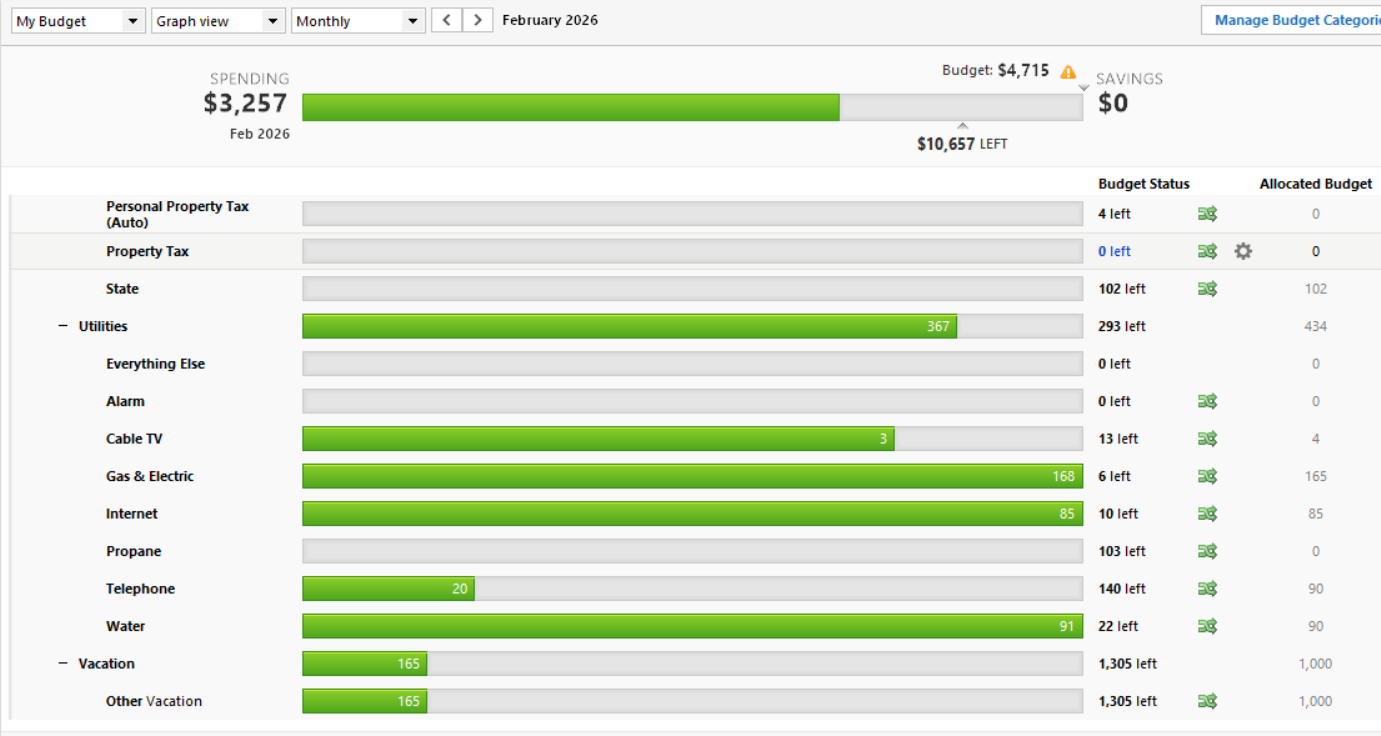
Many of the tasks that Brad and Jonathan discussed in Episode 586 about the expense audit are available in a one button report in Quicken. Expenses are easy to track in the budget. IMHO, it works better as a tracker than a planner. But, some folks use it as a planner as well. Below is a snip of a section of our budget from last month:
063518dc-81c8-4e7a-b3ee-ad044a2e10cc.png

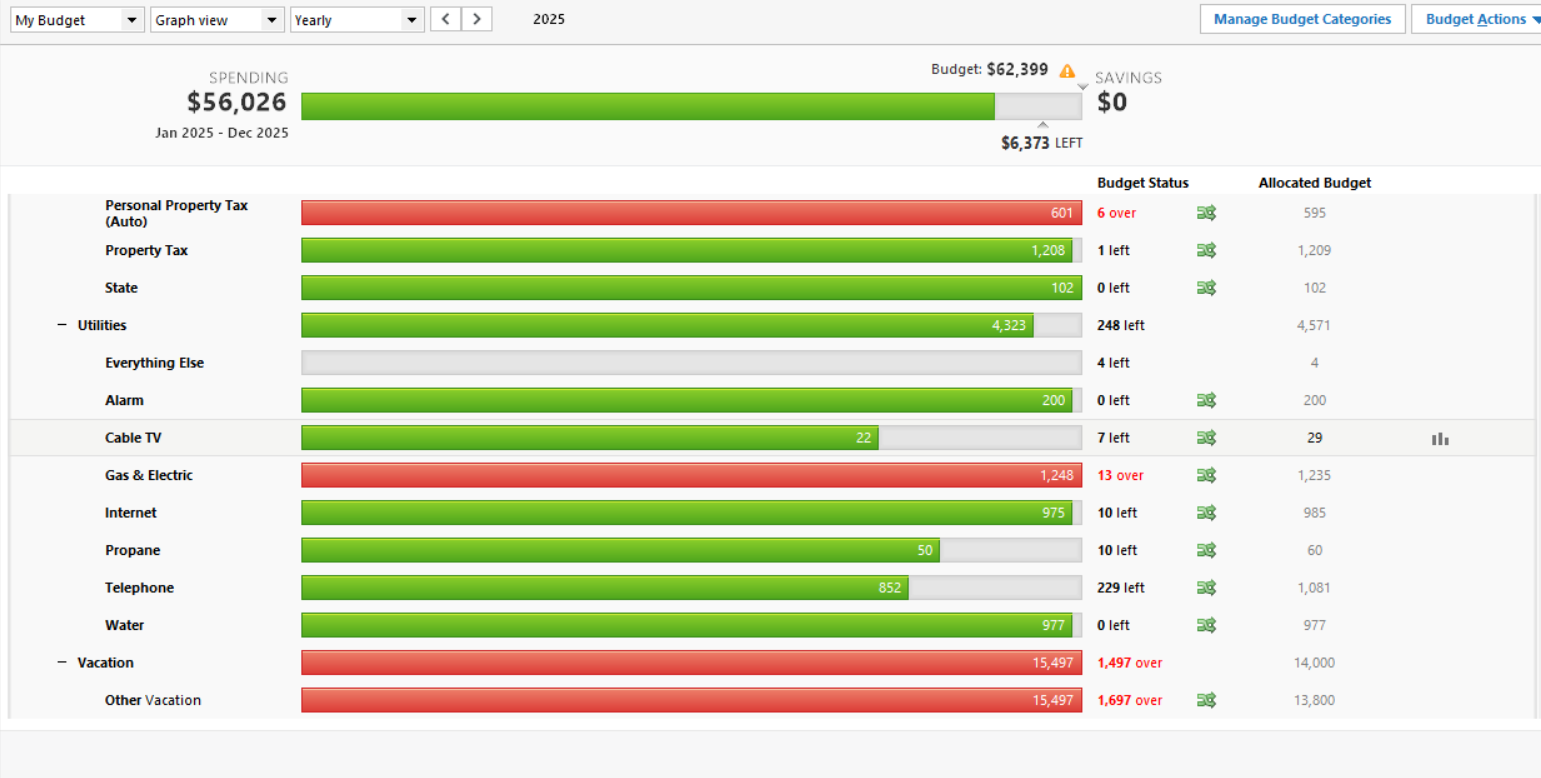
You can also look at annual and compare year over year. There are things it could do better - compare a specific month year over year would be cool. The reports are more robust than the graph. I like the graph because the green is red when we are over in a category. When that happens, I increase the category or try to cut spending in that category. Below is a section of our annual from last year: b2781e08-3e4f-4671-bec4-ccbc21f6fae0.png
negmatmullodzhanov

negmatmullodzhanov

1 month ago

I have been using Copilot for the past year. It is much more than just for networth tracking. My most favorite feature is that it shows where all your money is going daily (once you connect appropriate accounts). I’ve been using an iPhone app but I believe they recently released a web version as well. There is a monthly subscription fee, but if you want to give it a try for free to see if it is worth it here is a 2 month free referral code: RKHX4X.

setherby

setherby

1 month ago

I've used Mint (now credit karma) in the past and also Empower (Personal Capital). For the past year I've been using Monarch Money, paid version. You can find codes out there for 50% off your first year. I like it, but as others have said it's not perfect. It has a budgeting section, which like you, I don't use. It's great for watching NW and also monitoring all transactions…gives a lot of visibility. It's important to stay on top of transactions in all accounts IMO. For example, just yesterday, my wife's employer plan had three transactions resulting in about $100k in fees…which totally wasn't right. We were able to immediately spot it and call to get resolution. I also have a spreadsheet that I take snapshots in time, every quarter, so I can look back overtime and trend my projection more easily.

PLoftPAC

PLoftPAC

1 month ago

I use a couple different things. I use empower free version. I also use Monarch Money. Neither are perfect, unfortunately. What I really want is something that tracks my investments across accounts and gives me an accurate breakdown of asset class percentages. I am trying out a spreadsheet I found on Reddit which is pretty good, but you have to update your share amounts manually. I’m interested to hear if anyone has found anything better, so glad you asked this.

Pat

Chris Cannon

Chris Cannon

1 month ago

I'm using YNAB to track everything, still have version 4 license key so I don't use the subscription model. Once a month I just manually update the balances on my accounts.

MsBriDuncan

MsBriDuncan

1 month ago

I use Empower (PC) for historical tracking and boldin for the future.

davidmclifton

davidmclifton

1 month ago

Monarch Money is my latest - it does more than you are asking of it but I still find it the best for net worth. You connect to accounts as you would expect, it auto pulls including from investment accounts. I really like in the main dashboard the net worth change graph - you put for “year to date” or x months and it shows how your net worth has changed over time. I’ve used it for about 8 months so far and I can’t wait to see it change over longer time periods.

Daniel Seymour

Daniel Seymour

1 month ago

For a quick and dirty where am I at, I've been using Fidelity's built-in net worth tracker. It works well enough.

If I'm looking to do any sort of financial estimation or planning with the net worth data, Projection Lab all the way.

stags15

stags15

1 month ago

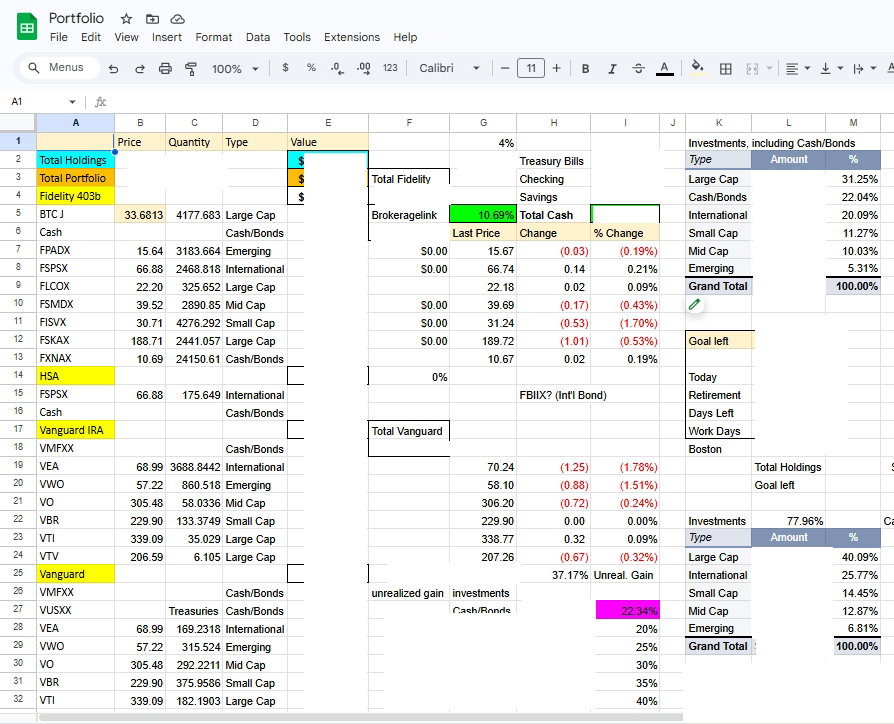
I like to record every transaction using GnuCash, which is similar to Quicken. But I use Google Sheets as well, and use that to help keep an eye on my portfolio mix. Here is how mine looks, with the actual dollars cut out of the snip. The security prices update automatically, for instance the formula in cell B7 is "=GoogleFinance($A7)". I have a few other personal calculations going on here - it wouldn't have to be that "busy". You would have to keep the quantity of each asset up to date of course.



UncleFrank

UncleFrank

1 month ago

Just a spreadsheet that we update every once in awhile. It's not like you are going to be doing anything with your net worth calculation on a short-term basis.

If you really want to analyze portfolios, use testfol.io. But that is a completely different function than just tracking net worth.

JoeQ17

JoeQ17

1 month ago

I’ve used Empower for years, yes syncing issues but not like we need to track NW and allocations daily. It’s order of magnitude. If you’re still in accumulation there shouldn’t be much to analyze.

If in retirement then be aware that empower and other apps don’t always properly allocation funds. Dbmf for instance splits between cash, bonds, alternatives, equities based on what it’s holding.

so I still use a spreadsheet once a month to confirm allocations with how I have them set towards a modified golden ratio portfolio.

projectionlab and boldin have some added features just like empower projections and scenarios. Just be mindful of the fine print on all of these as they have conservative projections and straight line more than use actual historical data and variances.

Jill Nordmann

Jill Nordmann

1 month ago

I moved from Personal Capital to Projection Lab. Similar to Boldin, it tracks your net worth and so much more. I can run scenarios with Monte Carlo simulations. To me, the value is in the planning tools vs just tracking.

mikeymike

mikeymike

1 month ago

Net worth -I use bolden. Doesn’t add any value for allocation that I am aware of.

JC

JC

1 month ago

I still use Personal Capital/Empower same as I always have. It's the same functionality for net worth tracking. The UI is slightly changed (for the worse I'd say) but that's just a minor cosmetic issue rather than functionality. Your experience is different?

JenSpokane

JenSpokane

2 months ago

We use Quicken Simplifi and started using it when Mint was killed off. It’s pretty darn good. We have syncing issues occasionally, but nothing horrible.

Showing 20 of 26 replies

View all replies on Community

Join the Discussion

Sign up to reply, follow discussions, and connect with the ChooseFI community.

Choose FI has partnered with CardRatings for our coverage of credit card products. Choose FI and CardRatings may earn compensation from card issuers when a customer clicks on a link, when an application is approved, or when an account is opened. Opinions, reviews, analyses & recommendations are the author's alone, and have not been reviewed, endorsed or approved by any of these entities. American Express is a ChooseFI advertiser.

Get Brad's weekly FI strategies — free

Join ChooseFI

Start your financial independence journey

  • Access to the ChooseFI community
  • Exclusive FI resources and tools
  • Weekly actionable insights
or

Already have an account? Log in

Try searching for

⌘K to open anytime

Your FI Journey

1/3

Step 1 of 3

How familiar are you with Financial Independence?