Key Takeaways
- You can launch a quality podcast for under $200 in equipment — a USB microphone, headphones, and free editing software are all you need to start.
- Consistency matters more than perfection. Publishing on a regular schedule (weekly or biweekly) builds audience trust and algorithmic favor on platforms like Apple Podcasts and Spotify.
- Your niche and unique angle matter more than production quality. Listeners stay for valuable content and authentic perspective, not studio-grade audio.
- Podcasting can become a meaningful income stream through sponsorships, affiliate partnerships, and community building — but it takes 6-12 months of consistent publishing to gain traction.
What's your FI number? Calculate it in 60 seconds
The one number that changes everything
Podcasting by the Numbers
The Step-by-Step Guide
How to Start a Podcast
Welcome Side Hustlers. If you're checking out this article because of the interview, I did on the Side Hustle Nation show, I have broken down my gear list by budget and expected use case.
With 31 million Youtube channels vs. 1 million podcasts, in the year 2020, the relative competition of podcasting to YouTube and the significantly decreased cost of production makes podcasting a compelling place to start.
The ChooseFI Podcast Network has launched three podcasts.
- ChooseFI
- Everyday Courage
- Rebel Entrepreneur
Each podcast uses a slightly different setup, depending on the host's needs and expected use.
I decided to start a podcast in the fall of 2016. My first question was: "How do I start a podcast?"
That question has led to literally thousands of other questions. The most important of those questions I am including in this article to help you cut through the noise.
Why Do I Prefer Podcasting over Youtube?
To be clear I love YouTube, it's a powerful brand-building platform. I just think Podcasting has several advantages when starting out. Here is the link to the episode I recorded with Nick Loper and Marco from whiteboard finance on The Side Hustle Show Podcast.
But in summary
- Less competition
- Lower cost of entry for equipment
- Drastically less production time
- Not nearly as many variables to control
- Easier to access guest
What Type of Podcast do You Want?
- Scripted: This can be fiction or nonfiction. This type of show is research dense, and the host is working off a prepared script or outline. Two of the most popular podcasts in this genre include Serial and Hardcore History.
- News Show/Daily Show: Most political and daily shows follow this tried and true model of recapping events in their niche.
- Educational: shows in this genre create/teach content either through interviews or scripted outlines. This type of show can be created in any niche, and you can build a community around an idea.
- Interview Podcast: This format usually involves bringing on a rotating series of guests, personality or subject matter experts to help craft informative or exciting stories.
Most of our shows fall into the Educational and Interview Category. Once you figure out the type of show you want to create, there are several basic questions to answer, which can help inform the equipment purchases.
- What's your format going to be?
- Are you going to have a co-host? (Remote or in-person)
- Are you going to be on the road?
- Are you a Mac or Windows User
- Are you going to be in a dedicated studio or recording out of your closet
Where Is Your Money Going?
Our free Expense Audit tool breaks down your spending by category and reveals exactly where you can save more. Create a free account to start.
- Category-by-category spending breakdown with visual charts
- Savings potential analysis — see where you can cut without pain
- Track spending month over month and celebrate wins
Free forever — no credit card required
Monthly Spending
$4,180
Potential savings: $620/mo identified
Spending by Category
$4,180
Spending
$620
Can Save
$7,440
Per Year
Preview — create free account to use
Launch Your Podcast Step by Step
Follow this proven process to go from idea to published episodes.
Define your niche and format
Choose a specific topic you can speak about consistently for 100+ episodes. Then decide on your format: solo, co-hosted, interview-based, or a hybrid. The most successful podcasts serve a clearly defined audience with a unique perspective. Broad topics like "business" or "self-help" are oversaturated — niching down (e.g., "financial independence for teachers") helps you stand out and attract loyal listeners.
Pro tip: Write down 30 episode ideas before committing to a topic. If you can easily list 30, you have enough depth for a sustainable show. If you struggle past 10, the niche may be too narrow.
Get your equipment and recording setup
You do not need a professional studio. Start with a quality USB microphone (Audio-Technica ATR2100x or Samson Q2U, both around $60-70), a pair of closed-back headphones, and a quiet room. Record into free software like Audacity or GarageBand. A pop filter ($10) and a simple desk mic stand ($15) round out the essentials. Total investment: under $200.
Pro tip: Record in the smallest, most furnished room in your home — closets and rooms with carpet, curtains, and bookshelves absorb sound reflections and dramatically improve audio quality for free.
Record and edit your first 3 episodes
Batch record your first 3 episodes before launching. This gives you a buffer and lets you refine your process. Keep episodes between 20-45 minutes for most formats. For editing, remove long pauses, filler words (um, uh), and background noise. Add a simple intro and outro with music (royalty-free from sites like Pixabay or Free Music Archive). Do not over-edit — authenticity resonates more than polish.
Pro tip: Record a "throwaway" episode zero that you never publish. This lets you work out technical issues and get comfortable behind the microphone without the pressure of a live audience.
Choose a hosting platform and submit to directories
Your podcast needs a hosting provider that stores your audio files and generates your RSS feed. Popular options include Buzzsprout, Libsyn, and Podbean — most offer free tiers or plans starting at $12-15/month. Once your hosting is set up, submit your RSS feed to Apple Podcasts, Spotify, Amazon Music, and Google Podcasts. This process takes 1-5 days for approval.
Pro tip: Choose a host that provides analytics and makes it easy to distribute to all major platforms. Buzzsprout auto-submits to most directories and provides clear download statistics.
Launch and promote consistently
Launch with 3 episodes so new listeners can binge and decide to subscribe. Promote on social media, email your network, and ask listeners to rate and review on Apple Podcasts — reviews improve discoverability. After launch, commit to a consistent publishing schedule. The single biggest predictor of podcast success is showing up every week (or every other week) without fail.
Pro tip: Ask guests to share their episode with their audience. Cross-promotion with other podcasters in your niche is the fastest organic growth strategy for new shows.
Recommended Podcast Gear
Microphone Selection
Budget Podcast Setup
Estimated Cost ($60-$120)
- 1 x Microphone Samson Q2U $60
Includes Mic Stand Consider Upgrading to Audio-Technica ATR2100x $99 if you have a Thunderbolt or USB Type C connection (Mac Users)
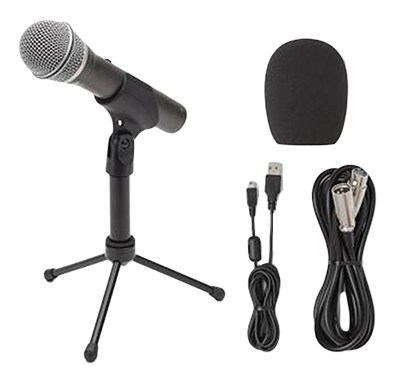 View Kit This simple setup will get you great audio 7/10 quality. With great off-axis noise rejection it's a great solution for one person setup and remote interviews.
Note: For the last three years, my favorite budget mic was the ATR-2100 They discontinued this Mic and replaced it with the ATR 2100X. The only difference is the upgrade to USB C and the increase in price to $99. if you are working on a newer Macbook and only have USB C/Thunderbolt connections, then I would consider it
Limitations: This works great for one person but doesn't scale well. Two individuals could share the Mic, but it's going to be a gimmicky and not a great long term solution.
Two-Person Setup (Cohost)
Estimated Cost ($200-$300)
- 2 x Microphone Samson Q2U $120
Includes Mic Stand, XLR Cables and Foam Pop Filters
- Digital Audio Interface - Focusrite Scarlett 2i2 $160
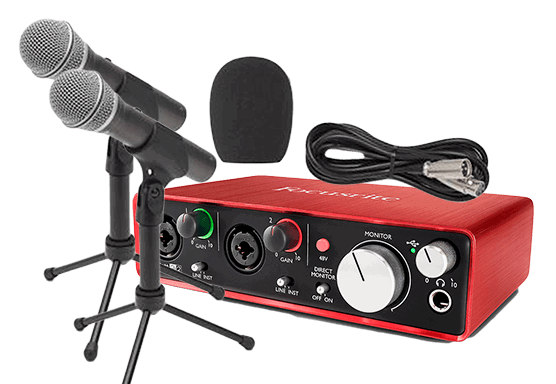 View Kit Total Cost: $300-400
Note: Once you start using more than one microphone, you will find that computers struggle with multiple USB audio inputs, this is where a Digital Audio Interface becomes useful.
A Digital Audio Interface will allow you to use two Microphones via an XLR connection and have your computer see it as a single USB connection. Also, the drivers for your Digital Audio Interface drastically reduce electronic interference, which ensures that your audio recording doesn't pick up any weird hums or grounding issues.
Note: This setup requires a computer to record
Travel & Flexible Setup
Estimated Cost ($400-$1000)
2 x Microphone Samson Q2U $120
If you want to upgrade Microphone consider
RE-320 ($225 Renewed or $299 New) or
Heil PR-40 ($329)
Digital Audio Interface - Zoom H6 $344
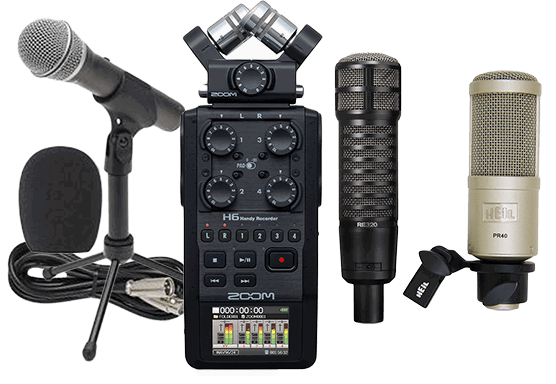 View Kit Notes:
The setup above is my ideal setup. It grows with you. It allows you to record on the road, at conferences, etc. without the need for a computer,
it can take up to 4 microphones and level each recording on multiple tracks.
The Budget for all of this can be between 300 to $400 for a two-person setup, scales up from there.
The setup above will work for up to 4 people on multi-track. It can record on the road without a computer. If needed, an attachment can be purchased to expand to up to 6 microphones.
Microphone Selection
Here are the Microphones We have used
- Samson Q2U $60
- ATR 2100 (Now the ATR 2100x) $99
- RE320 $299
- Shure SM7B $399
- Heil-PR40 $329
View Kit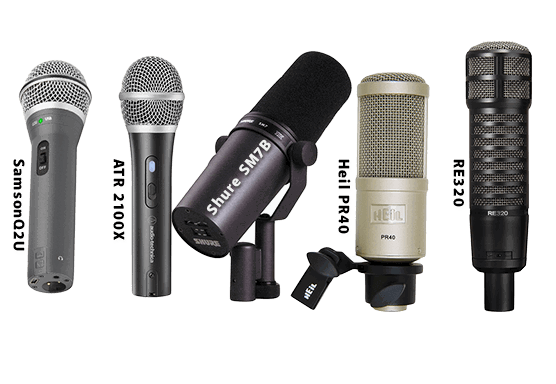 View Kit The ATR 2100 is one of the most flexible & versatile budget Microphones on the market. But here's the full list of microphones I have tested and why I prefer one over another for various situations.
The Samson Q2U is virtually identical to the original ATR 2100(now discontinued) for $30 less. I legitimately think it's created by the same factory and rebranded at a discount for Samson
SHURe SM7B
Controversial Position I think The Shure SM7B is overrated for podcasters. this seems to be a popular choice but I have used it extensively and have some misgivings about this microphone
View Kit 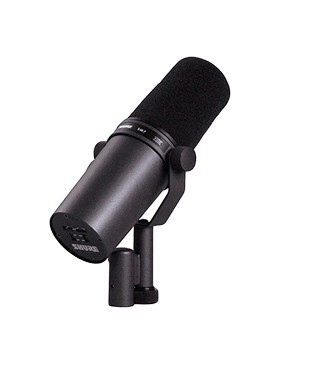 View Kit This microphone shines for singing/vocals and for video podcasts where your head is moving considerably, and mic technique is not at the forefront.
I'm not as big of a fan of it for podcasting when you're trying to tightly control the quality of your audio tracks and for preventing mic bleed. It is also the most gain hungry microphone that I have encountered. While you can get it to the gain you need using the preamps in your digital audio interface ( Focusrite Scarlett, Zoom, etc.), you will have to turn the gain up so high that you will hear here unpleasant hum in the background. You will likely need to add a cloudlifter or fethead to use it with your Digital Audio Interface (ugh), adding another 100- $200 onto your budget. Once you get it to the right volume, it is very susceptible to mic bleed. The Mic-bleed was the reason we stopped using it in the studio.
What is Mic Bleed
When you have two people in the same room, it complicates things considerably, and you have to take into consideration mic bleed. When your microphone picks up the voice of your cohost, it will sound echo-ey and unflattering, especially after you go through the mastering process. Some of this can be cleaned up in the editing process, but in a perfect world you limit as much as possible
Heil PR40
Best at removing Mic Bleed If Mic Bleed is your Biggest concern The Heil PR-40 is probably one of the best microphones I've tested
View Kit 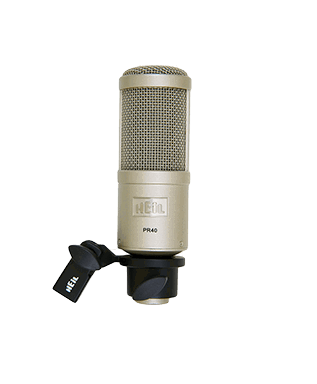 View Kit If Mic Bleed is your Biggest concern The Heil PR-40 is probably one of the best microphones I've tested for off access rejection along with the ATR 2100. But it requires consistently proper mic technique. The Heil PR-40 microphone is a poor choice for a video podcast because as soon as you move your head away from the Mic, the audio quality falls off. It also takes a fair amount of gain though not nearly as much as the Shure SM7B.
RE320
My Current Favorite Microphone fantastic natural sound (EQ), Great off access rejection, low noise threshold. and minimal gain needed
View Kit 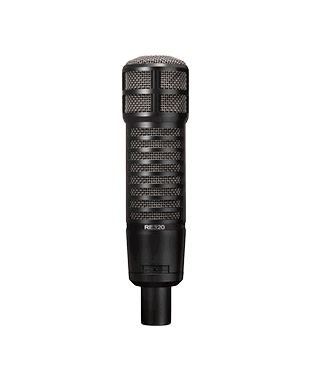 View Kit That brings me to my current favorite Microphone the RE320
You can get a refurbished RE320 for somewhere between $225 renewed to $299 new. It sounds great. It has a, just a very natural, perfect EQ. Minimal gain is needed, and it has a low noise threshold. In my opinion its the best mid-tier microphone for the money. Off Access Rejection is decent although not as extreme as the Heil PR-40 but good enough.
Tip Alert
These are all great microphones, and depending on the use case, one might have a benefit over another. one cool tip is to go to a local guitar center and try all of them to see which one makes your voice sound the best.
Audio Gain (Volume)
I've noticed with the Heil PR-40 and the Shure SM7B to get the signal volume as at my target recording gain (-12db) I ended up using something called a cloud lifter or a fethead. These devices require an extra XLR cable and phantom power, but they will give you an additional 10 to 20 dB of clean gain without adding any background hum That's additional equipment and cost. So if you are upgrading mics and want to avoid other equipment and cords, try the RE320.
Find your FI number in 60 seconds
Free calculator shows when you could reach financial independence — plus a savings rate tracker, expense audit, and more.
Accessories
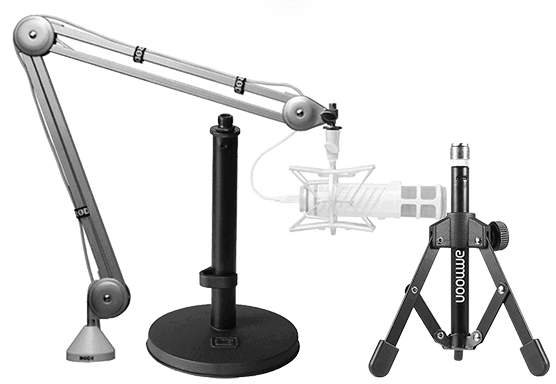
Mounting Options/ Mic Position
Your Microphone stand choice depends on your recording environment.
- My Favorite Boom Arm
- Favorite travel stand collapsable
- Favorite weighted stand
Headphones for Recording Podcast
ALWAYS wear headphones when recording. This is rule #1 of podcasting. This will allow you to monitor your audio volume and that of your guest. By monitoring your audio at all times, you ensure that you are maintaining proper distance from the microphone and that your audio is being captured.
I would highly recommend that you request your remote guests to wear headphones to prevent mic bleed from ruining your recording audio with unwanted echo. If you are interviewing guests in person, They may not need headphones.
While it's fine to start out with whatever headphones you already own. I would caution you to avoid wireless headphones and headphones with microphones as you might complicate the drivers on your computer and the last thing you want is to keep having to adjust settings or reconnecting
Headphones for Editing Podcast
If/when you edit a podcast it's important to listen with a neutral pair of studio headphones to ensure that you hear what your listener will hear and not a headphone enhanced version of the sound. Here are my three recommendations below.
My personal favorite is the MDR7506. and having spent many 1000's of hours behind a microphone this one has become a trusted friend
Headphone Options
Here are my three headphone recommendations
View Headphones 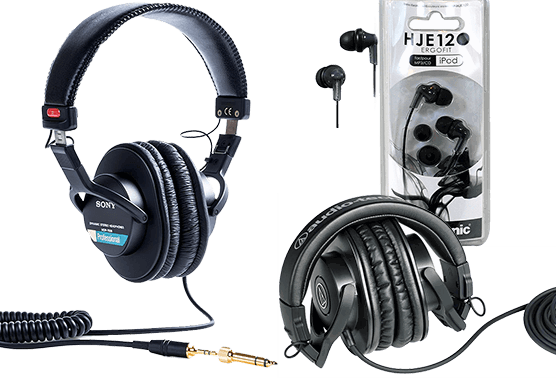 View Headphones
My Favorite Podcast Headphones
My personal favorite is the Sony MDR7506. and having spent many 1000's of hours behind a microphone this one has become a trusted friend
Room Treatment Sound Quality
Recording Location
You've got your recording software in place. You're ready to record picking a recording location. But now you realize that the acoustics in your room is the worst. Here are some tips that can improve your recording quality.
Echo and reverb.
Before you spend money, upgrading your microphone or equipment focuses on your room treatment.
That's why you find a lot of podcasters are recording from their closets. They're onto something.
Record in a room with a carpet if possible. The fabric on walls furniture clothing on hangers will help dampen that reverb.
here is an acoustic blanket that did a remarkable job reducing the reverb in my first podcast room on hardwood floors
I have one of them hanging by the door even now
TLDR
A carpeted room full of furniture and clothing will provide better acoustics than your garage or empty basement. If you can hear the echo in your headphones, then your audience will be able to as well
Software for Interviewing Remote Guest
If you are recording in Person you can skip this section but if you are interacting with guest here are the most popular options on the market
 Zoom
Free up to 40 min if you want a video Interview and want to use a simple software. Consider Zoom
I find the zoom compression worse than Skype. But the video feature Is very robust.
 Zencastr
 was the first software service to offer full fidelity local recordings when interviewing remote guest. It's priced very reasonably at $12 a month
Zencastr is a browser based recording software. It records on multitrack which is fantastic. you can share a link with your guest and they dont need to download any software. It has developed a reputation for something called the Zencastr Drift, where you'd have these two separate tracks, but they would get out of sync with each other. This can be cleaned up via Multitrack editing but it can happen
 SquadCast
 is new to the podcast scene but is seeing quick adoption by many in the podcast industry.
It records locally as well as to the cloud and has a patented process to avoid the drift issue. this ensures you get the best audio. It is still in startup phase and it can require some trouble shooting but I expect it to continue to grow in popularity and continue to be a more streamlined experience with additional development
Why don't I use Squadcast or Zencastr for ChooseFI?
There are free options for recording with guest as well and some are very good
Zoom, Google Meet, and Skype all have a free option. and while zoom and google meet compress the audio too much for me to be comfortable using them there are work arounds
We use Skype for ChooseFI
I will discuss why in the webinar next week, if your interested you can find the Registration on the sidebar
How Important is Sound Quality
If you are the host your audio quality needs to always be at 7/10 or better.
same for your cohost, but if you have a guest or a voicemail, you still want good quality audio but the bar can be lower for them without it dragging your show down. Clearly if the audio is garbage you can't and shouldn't use it, but your guest audio does not need to be as good as yours. Your audience isn't expecting that
Editing Software
Free Options
Here are the 2 best FREE options available
Audacity
Audacity is a fantastic free, open-source audio editor, although it takes a little getting used too. It's got most of the features that you would want.
Steve Stewart offers training as well as Audacity to Podcast
 Audacity Garageband
For Mac Users
GarageBand for Mac Users. I don't have much experience with Garage Band. It can do the job, and it's a free option if you're on a mac.
 Garage Band
Low-Cost Options
(Hindenburg, Reaper)
Reaper offers an extended free trial until your making money with it, then cost $60.
Hindenburg is $95.

Med to High-Cost Subscription
The Adobe suite is a subscription service
Audition starts at $20 a month and $80 for the full suite
I purchased a subscription to the Adobe suite early on because I wanted to also work with Photoshop, Premiere, and After Effects.
 Audacity An Audition subscription is expensive when compared with some of the other alternatives. I find the multi-track editor & noise reduction tool incredibly useful as part of my process. But as much as I love Audition, if I weren't interested in the full suite (Photoshop, AfterEffects, Premiere, & Audition) I would probably be working on Audacity or Reaper
Start Your FI Journey Today
Free calculators, a personalized FI roadmap, and a community of 25K+ on the same journey.
Create a free account to get started
Editing Your Podcast
There are actually 3 types of edits, and they have different purposes.
1) Get Rid of Offline Content
This is the most critical type of edit. This could be giving your guest an orientation or discussing the goals for the episode.
2) Clean up Filler Words (um, ah, like, you know)
There are so many filler words and after you get better at cutting out umm... your subconcious will quickly find new Verbal Tics to insert instead.
3) Artistic Edits (tightening a question or answer for clarity).
I still struggle giving a tight question. Sometimes I will spend 10-20 seconds trying to work the question into something usable. if you can cut through that noise in post and leave the most important parts of the question you dramatically improve the listener experience.
This last type of edit is what separates a good editor from a great one.
When you are editing your podcast yourself you have to decide how much time you want to put in each episode. You could spend six to 10 hours per episode, making it "perfect". But your going to burn out quickly and so I try to keep my editing within a 1:3 ratio. so a 1 hour podcast will take me up to 2-3 hours to produce end to end. Ideally it would be less than that but that is a reasonable average to expect
Master and Mixdown Your First Podcast
Exporting your Podcast
Once you finish editing your podcast you will save a final copy, a master.
Most Digital Audio Workstations (DAWs) will record in WAV (uncompressed)
Recording as a WAV file gives you the ability to make small adjustments to EQ and clean sound quality up. When you mixdown your final podcast, you will want a smaller file that doesn't take as much time to upload or download.
For a Podcast, I recommend that you export to MP3 96 kbps mono. That's what we use for all of our podcasts. Following these guidelines will reduce your file size on a 1-hour podcast from over 1 Gbs to 50 Mbs, which diminishes your hosting cost and saves your listeners time and bandwidth.
TL:DR:
Do everybody a favor and save as an MP3 at 96 Kbs and Mono.
What's Next
- Production Elements
- Picking a Hosting Service
- Preparing for Launch
- Finding your Audience
- Measuring Success
- Monetization
These are important considerations and I'm going cover them in detail in the free Live Event, as well as answer any questions you may have.
Register by clicking on the button below!
Save My Spot! [
Production Elements
- Production Elements are an important piece of creating the atmosphere of your podcast. It's the unspoken identity. Fortunately it doesn't have to be overwhelming and you don't have to get it right the first time.
So don't overthink this - you can always update it down the road.
Intro Voiceover and Music
Extro Voiceover and Music
Podcast Art
Listen to several podcast that you find interesting and see what approach they took. Come up with a short script for your intro.
Then record your voiceover or find a freelancer to do the voiceover for you
I found our voiceover artist on Fivvr
You can pick out a song your self for free from Garageband or Youtube Studio. or you could get a more unique song from Audio jungle or Epidemic Sound for a small fee.
then you can mix them down yourself in your audio Editor or pay a freelancer to mix it for you
Your Podcast Cover Art is going to be a Variation of the same process
Identify the look or feel you like and then create your version of it you can attempt to do it yourself using a free tool like CANVA or you could find a designer to do it for you
But what I would do is just. Listen to a couple that is maybe, you know, podcasts that you like to get a feel for what you appreciate about an intro. And maybe think about a shorter intro. One thing is, is, you know, no one wants to listen to a two-minute intro. So try to keep your intro, you know, sub 50 seconds.
Maybe between 20 to 40 seconds, and you just want to create the theme, create the experience. Some people can just start talking right away, but listen to a few podcasts and see what resonates with you. Once you have it, just come up with what script you want. And what I did is I just took that script on Fiverr, and I got someone to do an excellent voiceover read.
And then you got to find some music. Now you can't just get any music. So when you're picking your song out, maybe go to something like an audio jungle. And you can find a song there that you can license for a few dollars and
You can also get access to all the garage band music for free. It's a few understood that. YouTube has a bunch of songs on the YouTube platform that you can access for free as well. Something to keep in mind.
Podcast Cover Art
You can have this commissioned by someone on Fiver, 99 design, 48-hour logo. You could create your own using Canva or Snappa. Or go to Upwork and find a freelancer to do it for you.
You can update it or change it at any time. We've changed our cover art several times over the years
How to Create Podcast Cover Art
There are several free and paid tools out there for creating your podcast Cover Art.
Free
Canva
Inexpensive
Snappa
Fiverr
99 Design
48 Hour Logo
Getting 1% Better
Every week you are presented with the opportunity to get 1% better. I try to identify at least one process improvement that I could make at the end of each recording session. Over the years, those small improvements have made an incredible difference.
Leveling your Audio
Preventing clipping
Customizing your Effect Rack
Compressing Audio
Adding Video
Adding Audiograms
Mastering Audio
Creating a Session Template
1% better on audio usually starts with getting your speakers on a multi-track editor.
I have been a guest on multiple shows, and when I heard the audio after release, the recording levels were all over the map. Practically for your listener, that means they have to adjust the volume up and down constantly. because the person talking is either way too quiet or loud
I had to go through that myself, and my bar changed over time. I also got better, but those are the things to keep in mind. Now multi-track was a 1% better thing for us. One thing you notice if you're editing is that if the Mic is too low on one host or the other, do something to get the mic level back in line so that you have to do less editing next time.
Marking your recording as you go
Some software will give you the ability to Mark the tracks when you know that something's going to be offline. So if you're the host and you have the bandwidth, can you mark the recording- this makes your editors life much easier.
Podcast Meta Data
Think through your title, author tag description.
So that's great. But with podcasts, you don't have that option. You have to build your platform from the ground up. I highly recommend you create a blog/website to go with your podcast. Here is our epic how to start a blog article
Those are my general thoughts, and this is what we did. But let me know if this was helpful.
Build Your FI Plan
Map your path to financial independence with personalized calculators and milestone tracking.
- Save your progress
- Get personalized next steps
- Access calculators and resources
You're in!
Check your email to get started with your FI Plan.
Picking a Hosting Service
Picking Your Podcast Host.
I use Libsyn.
Very reasonable prices. Anchor, I believe, is a free one. There are some other Buzzsprout blueberry.
Once you get hosted on these platforms, they make it easy to submit to the essential directories that your listeners use. But when you do provide, you're going to want to be sh your bare minimum, want to show up on iTunes, and then Spotify Most of the Android podcast players are scraping from the apple feed, but you can also submit to Google podcast as well as Google play.
Preparing for Launch
Where to List Your Podcast
- Apple Podcast
- Spotify
- Stitcher
- iHeartRadio
- tune in
- Google podcast.
Finding Your Audience
How to Get People to Listen
Now, you've got this podcast and, but nobody knows it exists. Start by telling friends and family but don't be surprised by a lack of engagement. It took me months to get my mom to listen. and a year before any of my friends checked it out. you should still start there. Ask them to listen and leave you a rating and review. At this point, we are trying to find our first 5-10 listeners.
We can expand out from there. Put it on your social media, join relevant Facebook groups.
Many Facebook groups (Ours included) will have some sort of opportunity for self-promotion, hop on to Reddit and Quora, and answer questions point to your podcast when appropriate.
I highly recommend you start a website to act as a home base for your podcast traffic. This is crucial on so many levels.
Advertising, connection, Monetization, If you're in a particular niche, you can advertise for it if you want to make sure you have one of the things I did, as soon as you're committing to a podcast, go ahead and lockdown, try and lock down a website.
We have a great article here on how to start a blog. I do think that you should have this is one of the great things with Podcasting. Like, unlike YouTube, you're not given a choice. You know, YouTube is, you're just, you're adding value to YouTube platform, and YouTube is critical. You are providing the opportunity for mass exposure, the possibility of it.
Measuring Success
Data from The Feed most Recent
Find Your FI Number
See where you stand and model your path to financial independence with our free calculator.

You're in!
Check your email to get started with your FI Number.
Monetization
Link to Monetization Article
You May Also Like
Frequently Asked Questions
You can start for under $200 with a quality USB microphone ($60-70), headphones ($20-30), a pop filter ($10), and free recording software like Audacity. Hosting costs $0-15/month depending on the platform. You do not need expensive equipment to produce a professional-sounding show.
There is no perfect length — it depends on your format and content. Most successful podcasts range from 20-60 minutes. Solo episodes tend to work best at 15-30 minutes, while interviews often run 30-60 minutes. The key is to be as long as the content requires and no longer. Respect your listener's time.
The most common revenue streams are sponsorships (CPM-based ads, typically $18-50 per 1,000 downloads), affiliate partnerships, premium content or memberships, and selling your own products or services. Most podcasters need at least 1,000-5,000 downloads per episode before attracting sponsors.
No. Solo podcasts, co-hosted shows, and interview formats all work well. Solo shows give you full creative control and simpler scheduling. Co-hosted shows provide natural conversation energy and shared workload. Choose the format that matches your personality and availability.
The three most effective growth strategies are consistency (publishing on a reliable schedule), cross-promotion (guesting on other podcasts and having guests share their episodes), and SEO-optimized show notes on your website. Social media clips and email newsletters also help, but nothing replaces consistently delivering valuable content.
Buzzsprout is the most beginner-friendly option with automatic directory submission and clear analytics. Libsyn is the industry standard with more advanced features. Podbean offers a solid free tier. All three are reliable choices — pick the one whose interface you find most intuitive and start publishing.
The Bottom Line
Starting a podcast has never been more accessible or affordable. With under $200 in equipment, free editing software, and a hosting plan, you can reach a global audience from your spare bedroom. The barrier to entry is not money or technical skill — it is consistency. Define your niche, record your first three episodes, choose a hosting platform, and commit to a publishing schedule. Most podcasts fail because creators quit too early, not because the content was not good enough. If you have knowledge or a perspective worth sharing, the tools are ready and the audience is waiting.
Startup cost
<$200
Episodes before most podcasters quit
7
Monthly US podcast listeners
100M+